<?xml version="1.0" encoding="utf-8"?><feed xmlns="http://www.w3.org/2005/Atom" xml:lang="en"><generator uri="https://jekyllrb.com/" version="4.4.1">Jekyll</generator><link href="https://stuckinalocalminima.com/feed.xml" rel="self" type="application/atom+xml" /><link href="https://stuckinalocalminima.com/" rel="alternate" type="text/html" hreflang="en" /><updated>2026-08-16T22:03:22+00:00</updated><id>https://stuckinalocalminima.com/feed.xml</id><title type="html">StuckInALocalMinima</title><subtitle>I’m Bruno, a CS grad turned Senior Machine Learning Engineer who loves building things that run fast, scale well, and sometimes even work on the first try. Currently into deep learning, edge devices, and squeezing performance out of both code and coffee. ☕🤖
</subtitle><entry><title type="html">Caveman Saves Tokens by Doing Less, Not Just Saying Less</title><link href="https://stuckinalocalminima.com/blog/2026/caveman/" rel="alternate" type="text/html" title="Caveman Saves Tokens by Doing Less, Not Just Saying Less" /><published>2026-08-02T00:00:00+00:00</published><updated>2026-08-02T00:00:00+00:00</updated><id>https://stuckinalocalminima.com/blog/2026/caveman</id><content type="html" xml:base="https://stuckinalocalminima.com/blog/2026/caveman/"><![CDATA[<p>Caveman promises an appealing optimization for coding agents:</p>

<blockquote>
  <p>Same answers, 65% fewer output tokens. Brain still big. Mouth small.</p>
</blockquote>

<p>The idea is simple. Models often produce unnecessary explanations, narrate their tool calls, and pad conclusions with filler. Remove that verbosity and the agent should become faster and cheaper without becoming less capable.</p>

<p>Coding agents can consume a surprising number of tokens while inspecting repositories, running commands, and correcting their own mistakes. A small skill that removes wasted language sounds like an easy efficiency win. But a coding agent operates through a trajectory: call a tool, interpret the result, and decide whether to continue. An instruction that changes how the agent communicates can also change how it acts.</p>

<p>To measure that effect, I ran 60 tasks across Claude Code and Codex CLI using SWE Bench Verified, Terminal Bench 2, and USACO tasks. Caveman reduced Claude Code token usage by 18% and its reported cost by 25%, but in Codex token usage fell by only 3.9%.</p>

<p>The most important result was not how many tokens disappeared, but where they disappeared from. With Caveman enabled, Claude Code performed 17% fewer steps and made almost 20% fewer tool calls, and in Codex hidden reasoning tokens fell by 14%. Caveman didn’t merely make the agents speak less. It changed how much work they performed.</p>

<p>And if the skill mostly works by making the agent do less, adjusting the reasoning effort might be a better choice. Claude Code exposes reasoning effort as a native setting, and in this experiment medium effort reached roughly the same Pass@3 as Caveman with high effort while costing about 20% less. A style instruction that arrives at a similar operating point indirectly is harder to justify when a direct knob is one flag away.</p>

<h2 id="what-caveman-promises">What Caveman Promises</h2>

<p><a href="https://github.com/JuliusBrussee/caveman">Caveman</a> is a skill for Claude Code, Codex, Gemini, and other coding agents. It instructs the model to avoid narration, drop hedging, and communicate in compact fragments.</p>

<p>Its README summarizes the intended behavior with a memorable distinction:</p>

<blockquote>
  <p>Brain still big. Mouth small.</p>
</blockquote>

<p>The main benchmark compares ten standalone answers, including prompts such as explaining Git rebase, React rerenders, and Docker multistage builds. The reported average falls from about 1,200 output tokens to under 300, the headline reduction of 65%.</p>

<p>That result is plausible for those prompts. They ask for prose, and Caveman aggressively compresses prose. The problem is the extrapolation.</p>

<p>A single conversational answer and a repository level coding task have very different token distributions. In a coding agent, useful output is source code, patches, and exact error messages. Caveman leaves much of that unchanged.</p>

<p>The project itself acknowledges this distinction. Its documentation warns that Caveman only targets output tokens, adds input tokens of its own, and may become net negative when the original model is already concise. It also describes the honest evaluation control as Caveman versus a simple terse instruction, rather than Caveman versus an unconstrained baseline.</p>

<p>Those caveats are good. Caveman is free, open source, and doesn’t collect telemetry. The issue is that the headline claims are much broader than the evidence supporting them.</p>

<h2 id="the-experiment">The Experiment</h2>

<p>I evaluated five agent configurations:</p>

<table>
  <thead>
    <tr>
      <th>Configuration</th>
      <th>Agent</th>
      <th>Treatment</th>
    </tr>
  </thead>
  <tbody>
    <tr>
      <td><code class="language-plaintext highlighter-rouge">claude-baseline</code></td>
      <td>Claude Code with Sonnet 5</td>
      <td>High effort</td>
    </tr>
    <tr>
      <td><code class="language-plaintext highlighter-rouge">claude-caveman</code></td>
      <td>Claude Code with Sonnet 5</td>
      <td>Caveman injected at session start (high effort)</td>
    </tr>
    <tr>
      <td><code class="language-plaintext highlighter-rouge">claude-medium</code></td>
      <td>Claude Code with Sonnet 5</td>
      <td>Medium reasoning effort</td>
    </tr>
    <tr>
      <td><code class="language-plaintext highlighter-rouge">codex-baseline</code></td>
      <td>Codex CLI with GPT 5.6 Terra</td>
      <td>High effort</td>
    </tr>
    <tr>
      <td><code class="language-plaintext highlighter-rouge">codex-caveman</code></td>
      <td>Codex CLI with GPT 5.6 Terra</td>
      <td>Caveman forcibly activated (high effort)</td>
    </tr>
  </tbody>
</table>

<p>The benchmark contained 60 tasks: 20 from SWE Bench Verified, 30 from USACO, and 10 from Terminal Bench 2. Each task was executed three times under every configuration, for 900 trials in total.</p>

<p>The <code class="language-plaintext highlighter-rouge">claude-medium</code> configuration is particularly important. Comparing only baseline against Caveman mixes together two possible effects:</p>

<ol>
  <li>Caveman may compress communication.</li>
  <li>Caveman may cause the model to spend less effort.</li>
</ol>

<p>The medium effort arm provides a native way to reduce model effort without installing Caveman. It lets us ask whether the skill offers something beyond indirectly making the agent do less work.</p>

<h2 id="results">Results</h2>

<p>Claude Code showed substantial savings:</p>

<table>
  <thead>
    <tr>
      <th>Metric</th>
      <th style="text-align: right">Baseline</th>
      <th style="text-align: right">Caveman</th>
      <th style="text-align: right">Change</th>
    </tr>
  </thead>
  <tbody>
    <tr>
      <td>Total tokens</td>
      <td style="text-align: right">1,595,199</td>
      <td style="text-align: right">1,302,271</td>
      <td style="text-align: right">18.4% lower</td>
    </tr>
    <tr>
      <td>Output tokens</td>
      <td style="text-align: right">19,860</td>
      <td style="text-align: right">16,059</td>
      <td style="text-align: right">19.1% lower</td>
    </tr>
    <tr>
      <td>Reported cost</td>
      <td style="text-align: right">$1.003</td>
      <td style="text-align: right">$0.758</td>
      <td style="text-align: right">24.5% lower</td>
    </tr>
    <tr>
      <td>Steps</td>
      <td style="text-align: right">25.5</td>
      <td style="text-align: right">21.2</td>
      <td style="text-align: right">17.0% lower</td>
    </tr>
    <tr>
      <td>Tool calls</td>
      <td style="text-align: right">24.6</td>
      <td style="text-align: right">19.7</td>
      <td style="text-align: right">19.7% lower</td>
    </tr>
    <tr>
      <td>Agent prose characters</td>
      <td style="text-align: right">2,956</td>
      <td style="text-align: right">1,741</td>
      <td style="text-align: right">41.1% lower</td>
    </tr>
    <tr>
      <td>Pass@1</td>
      <td style="text-align: right">81.1%</td>
      <td style="text-align: right">80.0%</td>
      <td style="text-align: right">1.1 points lower</td>
    </tr>
    <tr>
      <td>Pass@3</td>
      <td style="text-align: right">91.7%</td>
      <td style="text-align: right">86.7%</td>
      <td style="text-align: right">5.0 points lower</td>
    </tr>
  </tbody>
</table>

<p>Codex showed a much smaller reduction:</p>

<table>
  <thead>
    <tr>
      <th>Metric</th>
      <th style="text-align: right">Baseline</th>
      <th style="text-align: right">Caveman</th>
      <th style="text-align: right">Change</th>
    </tr>
  </thead>
  <tbody>
    <tr>
      <td>Total tokens</td>
      <td style="text-align: right">418,852</td>
      <td style="text-align: right">402,402</td>
      <td style="text-align: right">3.9% lower</td>
    </tr>
    <tr>
      <td>Output tokens</td>
      <td style="text-align: right">5,252</td>
      <td style="text-align: right">4,757</td>
      <td style="text-align: right">9.4% lower</td>
    </tr>
    <tr>
      <td>Reasoning tokens</td>
      <td style="text-align: right">2,542</td>
      <td style="text-align: right">2,200</td>
      <td style="text-align: right">13.5% lower</td>
    </tr>
    <tr>
      <td>Reported cost</td>
      <td style="text-align: right">$0.257</td>
      <td style="text-align: right">$0.249</td>
      <td style="text-align: right">3.2% lower</td>
    </tr>
    <tr>
      <td>Steps</td>
      <td style="text-align: right">17.8</td>
      <td style="text-align: right">17.5</td>
      <td style="text-align: right">1.8% lower</td>
    </tr>
    <tr>
      <td>Tool calls</td>
      <td style="text-align: right">11.8</td>
      <td style="text-align: right">11.5</td>
      <td style="text-align: right">2.7% lower</td>
    </tr>
    <tr>
      <td>Pass@1</td>
      <td style="text-align: right">89.4%</td>
      <td style="text-align: right">85.0%</td>
      <td style="text-align: right">4.4 points lower</td>
    </tr>
    <tr>
      <td>Pass@3</td>
      <td style="text-align: right">93.3%</td>
      <td style="text-align: right">90.0%</td>
      <td style="text-align: right">3.3 points lower</td>
    </tr>
  </tbody>
</table>

<p>If we stop here, Caveman looks like a reasonable tradeoff for Claude and a poor one for Codex. Claude saves approximately one quarter of its modeled cost while losing little Pass@1, while Codex gives up considerably more performance for a 3.2% cost reduction.</p>

<p>But these aggregated numbers hide the most important part of the experiment.</p>

<h2 id="the-wrong-denominator">The Wrong Denominator</h2>

<p>Caveman promotes a reduction in output tokens. Coding agent cost, however, isn’t dominated by visible prose.</p>

<p>For Claude Code, the baseline token distribution looked like this:</p>

<table>
  <thead>
    <tr>
      <th>Quantity</th>
      <th style="text-align: right">Share</th>
    </tr>
  </thead>
  <tbody>
    <tr>
      <td>Cache hit rate</td>
      <td style="text-align: right">97.8%</td>
    </tr>
    <tr>
      <td>Output tokens as a share of all tokens</td>
      <td style="text-align: right">1.24%</td>
    </tr>
    <tr>
      <td>Visible prose as a share of output tokens</td>
      <td style="text-align: right">3.7%</td>
    </tr>
    <tr>
      <td>Visible prose as a share of all tokens</td>
      <td style="text-align: right">0.046%</td>
    </tr>
  </tbody>
</table>

<p>Directly generated prose accounts for only about 0.05% of Claude’s reported session token volume.<sup id="fnref:prose"><a href="#fn:prose" class="footnote" rel="footnote" role="doc-noteref">1</a></sup> A 41% reduction therefore removes only about 0.02% of the total tokens directly.</p>

<p>Shorter replies also make subsequent contexts slightly smaller, so the full mechanical saving from prose compression is larger than 0.02%. But even a deliberately generous fixed trajectory estimate puts that effect well below 1% of total token volume. Most output tokens are code, diffs, and commands that must remain exact. That’s nowhere near the observed 18% reduction.</p>

<p>The missing savings have to come from somewhere else. The trajectory data provides the answer: with Caveman, Claude took 17% fewer steps and made almost 20% fewer tool calls. Each removed turn avoided processing a large context again.</p>

<p>The expensive part of an agent is taking another turn.</p>

<h2 id="decomposing-the-reduction">Decomposing the Reduction</h2>

<p>The total token count can be decomposed approximately into two factors:</p>

<div class="language-text highlighter-rouge"><div class="highlight"><pre class="highlight"><code>total tokens = number of steps × tokens per step
</code></pre></div></div>

<p>Applying that decomposition gives the following:</p>

<table>
  <thead>
    <tr>
      <th>Comparison</th>
      <th style="text-align: right">Total tokens</th>
      <th style="text-align: right">Steps</th>
      <th style="text-align: right">Tokens per step</th>
    </tr>
  </thead>
  <tbody>
    <tr>
      <td>Codex baseline to Caveman</td>
      <td style="text-align: right">3.9% lower</td>
      <td style="text-align: right">1.8% lower</td>
      <td style="text-align: right">2.2% lower</td>
    </tr>
    <tr>
      <td>Claude baseline to Caveman</td>
      <td style="text-align: right">18.4% lower</td>
      <td style="text-align: right">17.0% lower</td>
      <td style="text-align: right">1.7% lower</td>
    </tr>
    <tr>
      <td>Claude baseline to medium</td>
      <td style="text-align: right">37.1% lower</td>
      <td style="text-align: right">20.7% lower</td>
      <td style="text-align: right">20.6% lower</td>
    </tr>
  </tbody>
</table>

<p>For Claude, approximately 92% of the token reduction is explained by taking fewer steps. <strong>Tokens per step barely changed.</strong></p>

<p>Caveman certainly changed the writing style. Visible prose fell by 41%, and prose per step also decreased. But this compressed prose was too small to explain the session level savings. The savings appeared because the model ended its trajectory earlier.</p>

<p>That interpretation is also visible in the tool usage:</p>

<table>
  <thead>
    <tr>
      <th>Metric</th>
      <th style="text-align: right">Claude baseline to Caveman</th>
    </tr>
  </thead>
  <tbody>
    <tr>
      <td>Steps</td>
      <td style="text-align: right">17.0% lower</td>
    </tr>
    <tr>
      <td>Tool calls</td>
      <td style="text-align: right">19.7% lower</td>
    </tr>
    <tr>
      <td>Shell calls</td>
      <td style="text-align: right">19.0% lower</td>
    </tr>
    <tr>
      <td>Agent execution time</td>
      <td style="text-align: right">15.6% lower</td>
    </tr>
  </tbody>
</table>

<p>A style instruction propagated into the action policy of the agent. This doesn’t automatically mean that the removed steps were useful. Agents can overinspect repositories, repeat tests unnecessarily, and continue reasoning after they already have a valid solution. Some trajectories should be shorter.</p>

<p>But it does mean that Caveman shrinks the brain along with the mouth.</p>

<h2 id="the-control-that-changes-the-conclusion">The Control That Changes the Conclusion</h2>

<p>The strongest argument against using Caveman isn’t the small drop in quality. It’s the <code class="language-plaintext highlighter-rouge">claude-medium</code> control.</p>

<p>Both configurations reached exactly the same Pass@3:</p>

<div class="language-text highlighter-rouge"><div class="highlight"><pre class="highlight"><code>Claude Caveman: 86.7%
Claude medium:  86.7%
</code></pre></div></div>

<p>But Caveman used 30% more tokens and cost 23% more than medium.</p>

<figure style="margin: 2rem 0; text-align: center;">
  <img src="https://stuckinalocalminima.com/assets/img/plano-costo-calidad.png" alt="Scatter plot comparing mean cost per trial and Pass@3 for Claude Code and Codex. Claude medium and Claude Caveman reach the same 86.7 percent Pass@3, but Caveman costs ~20 percent more." style="max-width: 100%; height: auto;" />
  <figcaption style="font-size: 0.9em; color: #666; margin-top: 0.75rem;">
    Mean cost per trial versus Pass@3. Better configurations move upward and to the left. Claude medium reaches the same Pass@3 as Claude Caveman at ~20% lower cost.
  </figcaption>
</figure>

<p>The chart makes the relevant comparison visible. On this plane, a configuration is dominated when another configuration achieves at least the same quality at a lower cost. Claude medium sits directly to the left of Claude Caveman: same Pass@3, lower cost.</p>

<p>The difference remains after accounting for successful trials:</p>

<table>
  <thead>
    <tr>
      <th>Metric</th>
      <th style="text-align: right">Medium</th>
      <th style="text-align: right">Caveman</th>
      <th style="text-align: right">Caveman overhead</th>
    </tr>
  </thead>
  <tbody>
    <tr>
      <td>Pass@1</td>
      <td style="text-align: right">77.2%</td>
      <td style="text-align: right">80.0%</td>
      <td style="text-align: right">2.8 points higher</td>
    </tr>
    <tr>
      <td>Pass@3</td>
      <td style="text-align: right">86.7%</td>
      <td style="text-align: right">86.7%</td>
      <td style="text-align: right">no change</td>
    </tr>
    <tr>
      <td>Tokens per resolved trial</td>
      <td style="text-align: right">1.30 million</td>
      <td style="text-align: right">1.63 million</td>
      <td style="text-align: right">25.3% more</td>
    </tr>
    <tr>
      <td>Cost per resolved trial</td>
      <td style="text-align: right">$0.749</td>
      <td style="text-align: right">$0.874</td>
      <td style="text-align: right">16.6% more</td>
    </tr>
  </tbody>
</table>

<p>The quality comparison between Caveman and medium is inconclusive at Pass@1: Caveman was 2.8 points higher, but the difference was not statistically significant. The efficiency comparison is much clearer. Both configurations reached the same 87% Pass@3, yet Caveman consumed 25% more tokens per resolved trial and cost 17% more.</p>

<p>This comparison changes the practical recommendation. Caveman can reduce resource use, but it does so by indirectly altering the agent’s trajectory. When Claude already provides a direct control for effort, using a global style instruction to reach a similar operating point is difficult to justify.</p>

<h2 id="why-codex-saved-less">Why Codex Saved Less</h2>

<p>Caveman reduced Claude token usage by 18%, but reduced Codex usage by only 3.9%. One possible explanation is that Codex had much less waste available to remove.</p>

<p>Before applying Caveman, the Codex and Terra combination already used substantially shorter and cheaper trajectories:</p>

<table>
  <thead>
    <tr>
      <th>Baseline metric</th>
      <th style="text-align: right">Claude Code with Sonnet 5</th>
      <th style="text-align: right">Codex with Terra</th>
    </tr>
  </thead>
  <tbody>
    <tr>
      <td>Tokens per trial</td>
      <td style="text-align: right">1,595,199</td>
      <td style="text-align: right">418,852</td>
    </tr>
    <tr>
      <td>Steps per trial</td>
      <td style="text-align: right">25.5</td>
      <td style="text-align: right">17.8</td>
    </tr>
    <tr>
      <td>Tokens per step</td>
      <td style="text-align: right">62,600</td>
      <td style="text-align: right">23,500</td>
    </tr>
    <tr>
      <td>Pass@1</td>
      <td style="text-align: right">81.1%</td>
      <td style="text-align: right">89.4%</td>
    </tr>
    <tr>
      <td>Pass@3</td>
      <td style="text-align: right">91.7%</td>
      <td style="text-align: right">93.3%</td>
    </tr>
  </tbody>
</table>

<p>Codex reported around 74% fewer tokens while obtaining slightly better resolution rates. This difference appeared at two levels: Codex took around 30% fewer steps, and each step processed around 62% fewer tokens.</p>

<p>That doesn’t prove that GPT 5.6 Terra is intrinsically more efficient than Sonnet 5. The comparison mixes the model with the scaffold, the tokenizer, and everything else that differs between two harnesses.</p>

<p>The defensible conclusion is narrower:</p>

<blockquote>
  <p>In this harness, Codex with Terra started from a much more token efficient trajectory than Claude Code with Sonnet 5.</p>
</blockquote>

<p>This provides a plausible explanation for the different Caveman results: Claude offered a long trajectory that the skill could truncate, while Codex already operated closer to a floor.</p>

<h3 id="caveman-needs-waste-to-remove">Caveman Needs Waste to Remove</h3>

<p>An exploratory analysis inside the Codex results supports this interpretation.</p>

<p>I divided the tasks into four groups according to their baseline token consumption. Caveman increased median consumption among the cheaper tasks and only produced savings among the more expensive ones:</p>

<table>
  <thead>
    <tr>
      <th>Baseline consumption group</th>
      <th style="text-align: right">Median token change with Caveman</th>
    </tr>
  </thead>
  <tbody>
    <tr>
      <td>First quartile</td>
      <td style="text-align: right">27% higher</td>
    </tr>
    <tr>
      <td>Second quartile</td>
      <td style="text-align: right">11% higher</td>
    </tr>
    <tr>
      <td>Third quartile</td>
      <td style="text-align: right">13% lower</td>
    </tr>
    <tr>
      <td>Fourth quartile</td>
      <td style="text-align: right">9.5% lower</td>
    </tr>
  </tbody>
</table>

<p>This analysis shouldn’t be treated as causal. The groups mix datasets, contain relatively few tasks, and are defined using observed baseline consumption. Regression to the mean may explain part of the pattern.</p>

<p>Still, the result is consistent with a floor effect. When the original trajectory is already compact, Caveman has little redundant work to remove. Its additional prompt and behavioral changes may cost more than they save. When a trajectory becomes unusually expensive, Caveman has more room to terminate it early.</p>

<p>The 3.9% aggregate reduction in Codex was therefore driven by the expensive tail. For the median Codex task, Caveman didn’t save tokens.</p>

<p>This suggests a better mental model:</p>

<blockquote>
  <p>Caveman behaves like an indirect effort limiter whose effectiveness depends on how inefficient the baseline agent already is.</p>
</blockquote>

<h2 id="quality">Quality</h2>

<p>Caveman didn’t improve aggregate Pass@1 or Pass@3 in any of the main comparisons.</p>

<p>For Claude:</p>

<div class="language-text highlighter-rouge"><div class="highlight"><pre class="highlight"><code>Pass@1: 81.1% → 80.0%
Pass@3: 91.7% → 86.7%
</code></pre></div></div>

<p>For Codex:</p>

<div class="language-text highlighter-rouge"><div class="highlight"><pre class="highlight"><code>Pass@1: 89.4% → 85.0%
Pass@3: 93.3% → 90.0%
</code></pre></div></div>

<p>The direction is consistent, but the experiment isn’t large enough to establish the magnitude precisely.</p>

<p>Bootstrap confidence intervals computed at the task level all crossed zero:</p>

<table>
  <thead>
    <tr>
      <th>Comparison</th>
      <th style="text-align: right">Pass@3 change</th>
      <th style="text-align: right">95% confidence interval</th>
    </tr>
  </thead>
  <tbody>
    <tr>
      <td>Claude baseline to Caveman</td>
      <td style="text-align: right">5.0 points lower</td>
      <td style="text-align: right">11.7 lower to 1.7 higher</td>
    </tr>
    <tr>
      <td>Claude baseline to medium</td>
      <td style="text-align: right">5.0 points lower</td>
      <td style="text-align: right">11.7 lower to 1.7 higher</td>
    </tr>
    <tr>
      <td>Claude medium to Caveman</td>
      <td style="text-align: right">no change</td>
      <td style="text-align: right">8.3 lower to 8.3 higher</td>
    </tr>
    <tr>
      <td>Codex baseline to Caveman</td>
      <td style="text-align: right">3.3 points lower</td>
      <td style="text-align: right">10.0 lower to 3.3 higher</td>
    </tr>
  </tbody>
</table>

<blockquote>
  <p>We found no evidence that Caveman improves task resolution. Every aggregate quality comparison moved in the negative direction, but the experiment was not large enough to estimate effects of a few percentage points precisely.</p>
</blockquote>

<p>There is one statistically detectable behavioral effect. Codex reasoning tokens fell by 14%, with a 95% confidence interval from 4.6% to 20% lower. Caveman doesn’t leave reasoning untouched, whatever the README says.</p>

<h2 id="other-evaluations">Other Evaluations</h2>

<p>A <a href="https://blog.jetbrains.com/ai/2026/07/speak-to-ai-agents-like-cavemen-tosave-tokens/">JetBrains evaluation</a> tested Caveman on Claude Code using Harbor and SkillsBench.</p>

<p>It measured an 8.5% reduction in output tokens, far below the advertised 65%, with no detectable quality difference. Its first ten task evaluation had suggested savings near 30%; the number fell after expanding the benchmark. Its explanation was structural: coding agent output is dominated by code, diffs, tool invocations, and exact strings that Caveman can’t safely compress.</p>

<p>That result is compatible with this experiment, but the medium effort arm adds an important control. Even when Caveman reduces a trajectory without producing a detectable quality loss, it may still be an inefficient way to reach that operating point.</p>

<p>Other evaluations tested an even simpler question: does Caveman outperform asking the model to “be brief”?</p>

<p><a href="https://www.maxtaylor.me/articles/i-benchmarked-caveman-against-two-words">Max Taylor</a> evaluated 24 prompts with prompt specific quality rubrics and found Caveman in roughly the same token and quality range as a two word concision instruction.</p>

<p><a href="https://alexriosme.substack.com/p/there-is-a-reason-that-caveman-is">Alex Rios</a> described the problem as the <em>Terse Control Fallacy</em>: comparing a sophisticated compression technique against silence instead of comparing it against the trivial alternative.</p>

<h2 id="the-brevity-preprint">The Brevity Preprint</h2>

<p>The Caveman README references the preprint <a href="https://arxiv.org/abs/2604.00025">Brevity Constraints Reverse Performance Hierarchies in Language Models</a> as evidence that shorter answers can sometimes improve accuracy.</p>

<p>The paper evaluated 31 models on 1,485 questions and identified 115 cases where smaller models systematically outperformed larger ones. The authors associate part of this behavior with overthinking: larger models sometimes elaborate beyond what’s useful and introduce additional opportunities for error. On this selected subset, constraining responses improved large model accuracy from 40% to 67%.</p>

<p>This is a meaningful result, but also a targeted one. The brevity intervention was evaluated on problems already exhibiting unusual scaling behavior, rather than across the benchmark as a whole.</p>

<p>There’s also an important difference in settings. The study evaluates standalone questions: no tools, no repository, no decision about whether to keep exploring. A coding agent must repeatedly decide what to do next.</p>

<p>The paper doesn’t validate Caveman as an agent optimization. At most, it shows that excessive elaboration can hurt on a selected group of standalone reasoning questions.</p>

<h2 id="per-dataset-breakdown">Per-Dataset Breakdown</h2>

<p>The aggregate results also hide substantial variation across task types:</p>

<table>
  <thead>
    <tr>
      <th>Dataset and agent</th>
      <th style="text-align: right">Token change</th>
      <th style="text-align: right">Pass@1 change</th>
      <th style="text-align: right">Pass@3 change</th>
    </tr>
  </thead>
  <tbody>
    <tr>
      <td>SWE Bench with Claude</td>
      <td style="text-align: right">28.8% lower</td>
      <td style="text-align: right">no change</td>
      <td style="text-align: right">5.0 points lower</td>
    </tr>
    <tr>
      <td>USACO with Claude</td>
      <td style="text-align: right">14.9% lower</td>
      <td style="text-align: right">no change</td>
      <td style="text-align: right">3.3 points lower</td>
    </tr>
    <tr>
      <td>Terminal Bench with Claude</td>
      <td style="text-align: right">4.1% higher</td>
      <td style="text-align: right">6.7 points lower</td>
      <td style="text-align: right">10.0 points lower</td>
    </tr>
    <tr>
      <td>SWE Bench with Codex</td>
      <td style="text-align: right">5.2% lower</td>
      <td style="text-align: right">11.7 points lower</td>
      <td style="text-align: right">5.0 points lower</td>
    </tr>
    <tr>
      <td>Terminal Bench with Codex</td>
      <td style="text-align: right">4.0% lower</td>
      <td style="text-align: right">3.3 points lower</td>
      <td style="text-align: right">10.0 points lower</td>
    </tr>
    <tr>
      <td>USACO with Codex</td>
      <td style="text-align: right">1.5% higher</td>
      <td style="text-align: right">no change</td>
      <td style="text-align: right">no change</td>
    </tr>
  </tbody>
</table>

<p>Each row compares that agent’s Caveman run against its own baseline, broken out by dataset.</p>

<p>SWE Bench with Claude was Caveman’s strongest case. It preserved Pass@1 while reducing token usage by almost 29%.</p>

<p>Terminal Bench with Claude was the opposite. Token usage increased while both success metrics fell, but that subset contained only 10 tasks, so a difference of 10 Pass@3 points represents a single task. One contrast in that subset produced a token ratio above 100% because of one unusual task.</p>

<p>USACO with Codex showed no quality degradation, but the baseline already reached 100% Pass@3. That subset had little room to distinguish the configurations.</p>

<p>The result depends on the agent, the model, and the dataset. Probably on the individual task too.</p>

<h2 id="limitations">Limitations</h2>

<p>This experiment has several limitations:</p>

<ul>
  <li>
    <p>The runs used Harbor as the evaluation harness. The reported cost is modeled rather than billed because they used subscription authentication rather than API keys.</p>
  </li>
  <li>
    <p>Timed out runs didn’t report token or cost metrics. The estimated savings should therefore be treated as approximate rather than exact.</p>
  </li>
  <li>
    <p>Claude and Codex receive Caveman through different integration mechanisms. That reflects how the skill is distributed for those tools, but it means cross agent comparisons mix the skill with its delivery path.</p>
  </li>
  <li>
    <p>The experiment needs more tasks to estimate small quality effects. Most tasks were solved in all three attempts or failed in all three, and only about ten of the sixty produced mixed results within a configuration, so three trials don’t provide three independent observations. With sixty tasks and few discordant pairs, differences around five percentage points remain uncertain.</p>
  </li>
  <li>
    <p>The medium arm controls for cost and effort, but not for style. A stronger future design would include a plain instruction such as “communicate briefly, but do not change your exploration or verification behavior.”</p>
  </li>
</ul>

<h2 id="should-you-use-caveman">Should You Use Caveman?</h2>

<p>I’d use Caveman primarily as a style preference. If you find terse status updates and compact final answers easier to read, that alone may be a good reason to enable it.</p>

<p>Enabling it, though, does more than change the wording. Caveman reaches into the trajectory itself: how much the agent reasons, how many tools it calls, and when it decides the task is done. If you’re worried about quality loss, raising reasoning effort may compensate, but that spends back the tokens Caveman saved.</p>

<p>If the goal is reducing cost, I’d prefer explicit controls such as reasoning effort or context management. These mechanisms target resource usage directly and are easier to evaluate.</p>

<p>Caveman makes an agent more concise. Making it more efficient is a different claim, and this experiment doesn’t support it.</p>

<h2 id="the-broader-lesson">The Broader Lesson</h2>

<p>The most interesting result isn’t specific to Caveman.</p>

<p>A system prompt is part of an agent’s policy.</p>

<p>Instructions about tone, confidence, or verbosity may look cosmetic, but they can influence more than the text an agent produces. Because the agent repeatedly conditions its next action on those instructions, a request for concision can also affect how long it explores, how many tools it uses, and when it decides that the task is finished.</p>

<p>That’s what happened here. Caveman did save tokens in Claude Code, but most of the reduction came from shorter trajectories. Tokens per step barely moved. Codex, which already started from a shorter and cheaper trajectory, had much less room for that effect.</p>

<p>This is also why explicit controls matter. When the goal is to trade reasoning effort for cost, a native effort setting targets that tradeoff directly. In this experiment, medium reasoning reached the same Pass@3 as Caveman while using fewer tokens and costing less.</p>

<p>The broader lesson is simple: instructions that look like presentation choices can become behavioral interventions once they’re placed inside an agent loop.</p>

<h2 id="future-work">Future Work</h2>

<p>There are several ways to extend this experiment.</p>

<p>The first is simply scale. Sixty tasks were enough to reveal clear behavioral differences, but not enough to estimate small changes in resolution rate precisely. A larger evaluation would reduce that uncertainty and make dataset specific effects easier to distinguish. It would also be interesting to include newer and harder benchmarks such as DeepSWE.</p>

<p>The second is model diversity. This experiment only covers Claude Code and Codex with one model family each. Repeating it with models from other families, such as DeepSeek, Kimi, or Muse Spark, would help determine whether Caveman’s effects depend on the underlying model. The large difference observed between Claude Code and Codex already suggests that its impact may depend strongly on both the model and the agent scaffold.</p>

<p>The most important control, however, would be a minimal terse control. Just something like <code class="language-plaintext highlighter-rouge">be concise</code> or <code class="language-plaintext highlighter-rouge">be brief</code> added to the system prompt. A stronger follow up experiment would therefore compare baseline, a minimal terse control, Caveman, and native effort controls across more tasks and model families. That would make it possible to separate style, effort, and agent behavior much more cleanly.</p>

<h2 id="references">References</h2>

<p>Caveman repository: <a href="https://github.com/JuliusBrussee/caveman">https://github.com/JuliusBrussee/caveman</a></p>

<p>Caveman evaluation directory: <a href="https://github.com/JuliusBrussee/caveman/tree/main/evals">https://github.com/JuliusBrussee/caveman/tree/main/evals</a></p>

<p>JetBrains evaluation: <a href="https://blog.jetbrains.com/ai/2026/07/speak-to-ai-agents-like-cavemen-tosave-tokens/">https://blog.jetbrains.com/ai/2026/07/speak-to-ai-agents-like-cavemen-tosave-tokens/</a></p>

<p>Max Taylor, <em>I benchmarked caveman against two words</em>: <a href="https://www.maxtaylor.me/articles/i-benchmarked-caveman-against-two-words">https://www.maxtaylor.me/articles/i-benchmarked-caveman-against-two-words</a></p>

<p>Alex Rios, <em>There is a reason that caveman is a character from the past</em>: <a href="https://alexriosme.substack.com/p/there-is-a-reason-that-caveman-is">https://alexriosme.substack.com/p/there-is-a-reason-that-caveman-is</a></p>

<p><em>Brevity Constraints Reverse Performance Hierarchies in Language Models</em>: <a href="https://arxiv.org/abs/2604.00025">https://arxiv.org/abs/2604.00025</a></p>

<p><em>How Do AI Agents Spend Your Money? Analyzing and Predicting Token Consumption in Agentic Coding Tasks</em>: <a href="https://arxiv.org/abs/2604.22750">https://arxiv.org/abs/2604.22750</a></p>

<div class="footnotes" role="doc-endnotes">
  <ol>
    <li id="fn:prose">
      <p>The prose estimate converts visible agent text into an approximate token count. <a href="#fnref:prose" class="reversefootnote" role="doc-backlink">&#8617;</a></p>
    </li>
  </ol>
</div>]]></content><author><name></name></author><category term="ai" /><category term="llm" /><category term="agents" /><category term="claude" /><summary type="html"><![CDATA[I ran an experiment to test whether Caveman makes coding agents cheaper without making them worse. The savings were real, but they didn't come from the mechanism being advertised.]]></summary></entry><entry><title type="html">Training with scikit-learn, Deploying with the Right Runtime</title><link href="https://stuckinalocalminima.com/blog/2026/tree-compiler/" rel="alternate" type="text/html" title="Training with scikit-learn, Deploying with the Right Runtime" /><published>2026-02-28T00:00:00+00:00</published><updated>2026-02-28T00:00:00+00:00</updated><id>https://stuckinalocalminima.com/blog/2026/tree-compiler</id><content type="html" xml:base="https://stuckinalocalminima.com/blog/2026/tree-compiler/"><![CDATA[<h2 id="compiling-scikit-learn-trees-to-source-code-deploying-ml-with-the-right-runtime">Compiling scikit-learn Trees to Source Code: Deploying ML with the Right Runtime</h2>

<p>Deploying a machine learning model is not the same problem as training it.</p>

<p>Training environments are built for flexibility. They optimize for experimentation, rapid iteration, rich APIs, and numerical breadth. Deployment environments optimize for something very different: latency, memory footprint, startup time, packaging simplicity, and operational cost.</p>

<p>In this post I use decision trees and random forests as a controlled simplification of a broader issue: how we deploy ML models in production. Trees are useful here precisely because their inference logic is easy to reason about. They let us isolate the systems problem without hiding behind heavy linear algebra or GPU acceleration. The point is not that trees are special. The point is that deployment deserves its own engineering decisions.</p>

<p>TreeCompiler is a small proof of concept built around that idea. It compiles scikit-learn DecisionTreeClassifier and RandomForestClassifier models into standalone Python or Go source code. No scikit-learn. No numpy. No scientific stack at inference time.</p>

<p>The goal is not to replace frameworks. The goal is to make explicit a systems principle: inference deserves its own runtime.</p>

<hr />

<h2 id="a-quick-reminder-how-trees-and-forests-work">A Quick Reminder: How Trees and Forests Work</h2>

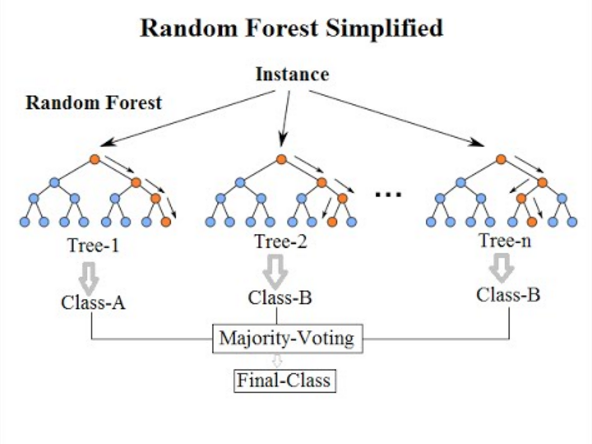
<p>A decision tree recursively partitions the feature space using axis-aligned splits. At each internal node, a single feature and threshold are chosen to reduce impurity (for example using Gini or entropy). Inference is simply walking the tree from root to leaf by evaluating comparisons like <code class="language-plaintext highlighter-rouge">x[j] &lt;= threshold</code>. A random forest is an ensemble of such trees trained on bootstrapped samples and random feature subsets. At inference time, each tree produces a prediction (or probability vector), and the forest aggregates them, typically by averaging probabilities (soft voting).</p>

<div style="text-align: center;">
  <img src="https://miro.medium.com/v2/1*i0o8mjFfCn-uD79-F1Cqkw.png" alt="Decision tree and random forest diagram" style="max-width: 100%; height: auto;" />
</div>

<p>If you want a deeper refresher, the scikit-learn documentation provides a clear overview of the algorithmic details: <a href="https://scikit-learn.org/stable/modules/tree.html">https://scikit-learn.org/stable/modules/tree.html</a></p>

<p>The important part for this discussion is this: inference is just branching logic and basic arithmetic. There is no heavy linear algebra involved.</p>

<hr />

<h2 id="training-runtime-vs-inference-runtime">Training Runtime vs Inference Runtime</h2>

<p>When we talk about inference cost, we usually think about raw compute: CPU cycles per forward pass, vectorized math, and numerical throughput. For tree-based models, however, the computation itself is small. A decision tree prediction is mostly a sequence of comparisons, and a random forest repeats that process across multiple trees before averaging the results. That means the largest cost often comes from the machinery around the model rather than from the model logic itself: importing large numerical libraries, deserializing pickled objects, allocating arrays, shipping container images with hundreds of megabytes of dependencies, and managing compatibility across Python versions and architectures.</p>

<p>Those costs make sense in a training environment, where flexibility, experimentation, and rich APIs matter. They make much less sense in an inference environment, where the model has already been trained and the runtime only needs to execute a fixed set of operations. TreeCompiler explores what happens when we separate those concerns. By turning the learned tree structure into explicit source code, inference no longer depends on a general-purpose ML framework to load and execute a serialized artifact. The deployed program contains only the branching logic required for prediction, which reduces startup work, dependency loading, object allocation, and packaging overhead. In compiled targets, it also gives the compiler a simpler program to optimize: deterministic control flow, constant thresholds, direct comparisons, and small functions instead of a dynamic model object interpreted through a training framework.</p>

<hr />

<h2 id="what-the-compiler-actually-does">What the Compiler Actually Does</h2>

<p>Scikit-learn stores a trained decision tree as arrays: left children, right children, feature indices, thresholds, and class counts per node. Prediction consists of walking those arrays until a leaf is reached.</p>

<p>TreeCompiler extracts that structure into an intermediate representation and generates explicit source code with nested if/else branches.</p>

<p>For a small tree, the generated Python looks like this:</p>

<div class="language-python highlighter-rouge"><div class="highlight"><pre class="highlight"><code><span class="k">def</span> <span class="nf">predict_proba</span><span class="p">(</span><span class="n">x</span><span class="p">):</span>
    <span class="k">if</span> <span class="n">x</span><span class="p">[</span><span class="mi">2</span><span class="p">]</span> <span class="o">&lt;=</span> <span class="mf">2.45</span><span class="p">:</span>
        <span class="k">return</span> <span class="p">[</span><span class="mf">1.0</span><span class="p">,</span> <span class="mf">0.0</span><span class="p">,</span> <span class="mf">0.0</span><span class="p">]</span>
    <span class="k">else</span><span class="p">:</span>
        <span class="k">if</span> <span class="n">x</span><span class="p">[</span><span class="mi">3</span><span class="p">]</span> <span class="o">&lt;=</span> <span class="mf">1.75</span><span class="p">:</span>
            <span class="k">return</span> <span class="p">[</span><span class="mf">0.0</span><span class="p">,</span> <span class="mf">0.91</span><span class="p">,</span> <span class="mf">0.09</span><span class="p">]</span>
        <span class="k">else</span><span class="p">:</span>
            <span class="k">return</span> <span class="p">[</span><span class="mf">0.0</span><span class="p">,</span> <span class="mf">0.02</span><span class="p">,</span> <span class="mf">0.98</span><span class="p">]</span>
</code></pre></div></div>

<p>The generated code has no imports and no runtime dependencies, only comparisons and simple arithmetic. For a random forest, TreeCompiler generates one function per tree and performs soft voting by averaging the predicted probabilities. Once inference is represented as explicit source code, the deployment shape changes: scikit-learn is no longer required at runtime, and the model is no longer a serialized artifact loaded by an external framework, but part of the executable itself. That shift directly affects latency, memory usage, packaging, and deployment complexity.</p>

<hr />

<h2 id="benchmark-setup">Benchmark Setup</h2>

<p>To make the impact concrete, I benchmarked three deployment strategies on AWS Lambda, all using the same model:</p>

<p>RandomForestClassifier, 50 trees, depth 8, 4 classes, 20 features.</p>

<p>Each function was configured with 128MB of memory, which is the minimum allocation for AWS Lambda.</p>

<p>Deployment strategies:</p>

<ol>
  <li>scikit-learn inside a Docker image.</li>
  <li>Python code (generated source, standard Python runtime).</li>
  <li>Compiled Go (generated source compiled into a static binary).</li>
</ol>

<p>Python and Go expose two different optimization surfaces. In Python, the generated tree code is still executed by an interpreter, so the runtime sees the model as bytecode to evaluate step by step. In Go, the generated source is compiled ahead of time into native machine code. That gives the compiler a chance to apply optimizations before the function ever runs: lowering comparisons and arithmetic into direct CPU instructions, choosing efficient register and stack layouts.</p>

<p>Once inference is reduced to pure branching logic, the runtime itself becomes the dominant factor.</p>

<hr />

<h2 id="python-vs-compiled-python-same-language-different-runtime-shape">Python vs Compiled Python (Same Language, Different Runtime Shape)</h2>

<table>
  <thead>
    <tr>
      <th>Metric</th>
      <th>scikit-learn (Docker)</th>
      <th>Python Compiled</th>
    </tr>
  </thead>
  <tbody>
    <tr>
      <td>Cold init</td>
      <td>2.05s</td>
      <td>450.8ms</td>
    </tr>
    <tr>
      <td>Warm p50</td>
      <td>22.4ms</td>
      <td>1.8ms</td>
    </tr>
    <tr>
      <td>Warm p95</td>
      <td>30.5ms</td>
      <td>15.7ms</td>
    </tr>
    <tr>
      <td>Memory</td>
      <td>201 MB</td>
      <td>127 MB</td>
    </tr>
  </tbody>
</table>

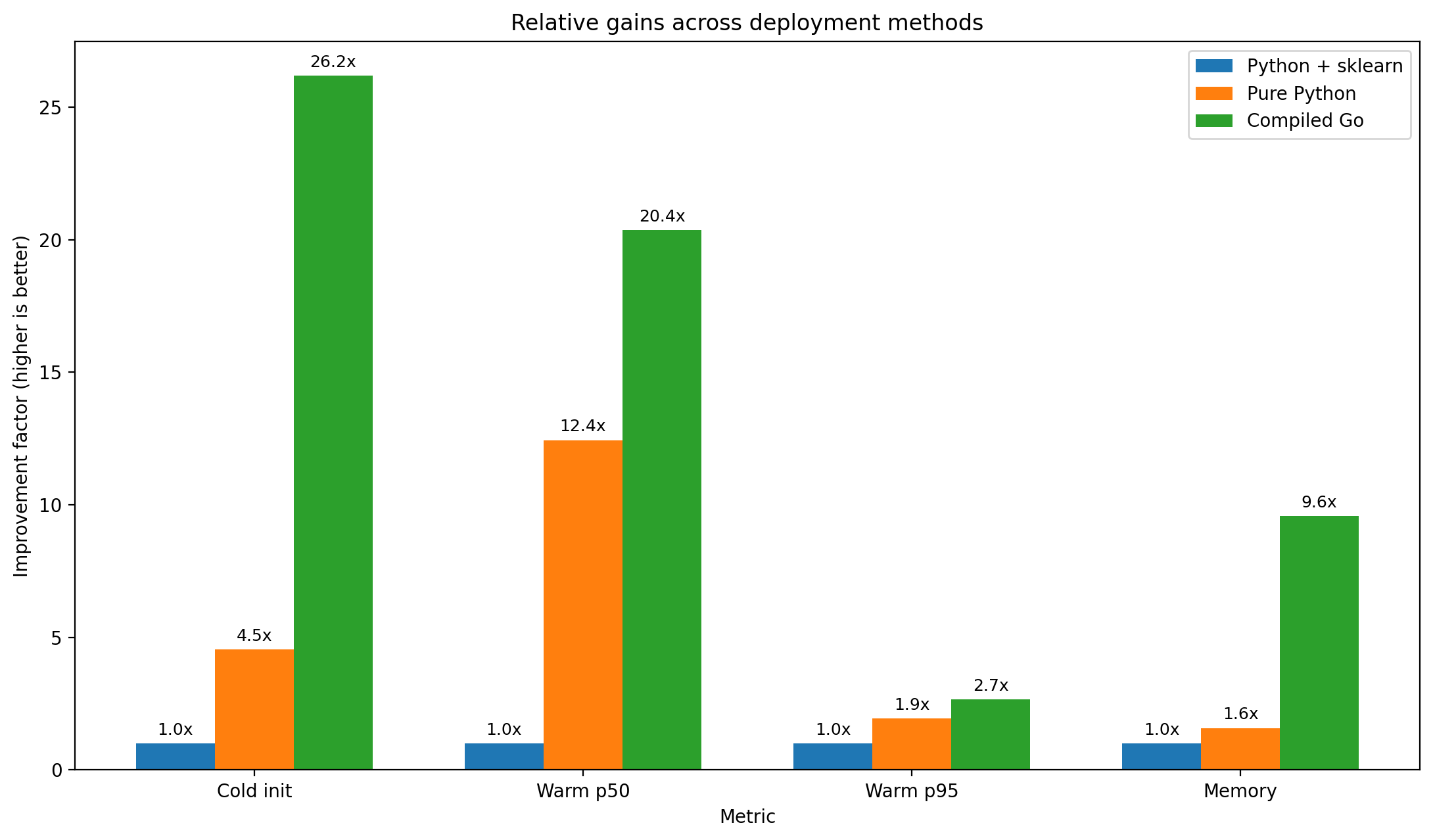
<p>Cold init measures the time required to initialize the execution environment before the first request. Warm p50 and warm p95 measure latency after the environment is already running: p50 captures the median request, while p95 captures tail latency near the slowest 5% of requests. Memory is the peak memory consumption observed during execution. Under those definitions, compiled Python changes the shape of the service even though the model is the same: cold initialization drops from 2.05 seconds to 450.8 milliseconds, roughly <strong>4.5x faster</strong>, or about a 78% reduction in startup time. Warm p50 falls from 22.4ms to 1.8ms, <strong>over 12x faster</strong>, roughly a 92% reduction in median latency. Warm p95 drops from 30.5ms to 15.7ms, almost <strong>2x faster</strong> at the tail. Memory decreases from 201MB to 127MB, a <strong>37% reduction</strong>.</p>

<p>Those improvements do not come from changing the forest, the features, or the prediction rule. They come from changing what has to exist at inference time. The generated Python function still runs on the Python interpreter, but it no longer needs to import and initialize scikit-learn, load a pickled object graph, allocate NumPy structures, or carry a full scientific stack just to execute a sequence of branches. Even within the same language, replacing a framework-driven runtime with explicit prediction code produces structural gains in startup time, latency, and memory usage.</p>

<hr />

<h2 id="compiled-python-vs-compiled-go-different-runtime-model">Compiled Python vs Compiled Go (Different Runtime Model)</h2>

<table>
  <thead>
    <tr>
      <th>Metric</th>
      <th>Python Compiled</th>
      <th>Go Compiled</th>
    </tr>
  </thead>
  <tbody>
    <tr>
      <td>Cold init</td>
      <td>450.8ms</td>
      <td>78.3ms</td>
    </tr>
    <tr>
      <td>Warm p50</td>
      <td>1.8ms</td>
      <td>1.1ms</td>
    </tr>
    <tr>
      <td>Warm p95</td>
      <td>15.7ms</td>
      <td>11.5ms</td>
    </tr>
    <tr>
      <td>Memory</td>
      <td>127 MB</td>
      <td>21 MB</td>
    </tr>
  </tbody>
</table>

<p>Moving from pure Python to compiled Go pushes the same generated model into a different execution model. Cold initialization drops from 450.8ms to 78.3ms, roughly <strong>5.7x faster</strong>, or an 83% reduction. Warm p50 improves from 1.8ms to 1.1ms, about <strong>1.6x faster</strong>, while warm p95 drops from 15.7ms to 11.5ms, improving tail latency by roughly <strong>27%</strong>. Memory falls from 127MB to 21MB, an <strong>83% reduction</strong>, or about <strong>6x smaller</strong>. The warm latency gains are smaller than the scikit-learn to compiled Python jump because both versions already execute minimal prediction logic. The remaining difference comes from the runtime around that logic.</p>

<p>In the Python version, the generated code is explicit, but it still runs through the Python interpreter and Python object model. In the Go version, the same tree structure is compiled ahead of time into a static binary, so the executable can start with much less runtime machinery and the compiler can lower the generated comparisons, constants, and function calls into native code. For a workload made almost entirely of deterministic branches and simple arithmetic, that matters: there is little numerical work left to optimize, so startup cost, memory footprint, and runtime dispatch become the dominant factors.</p>

<hr />

<h2 id="translating-this-into-economic-impact">Translating This Into Economic Impact</h2>

<p>In serverless systems, latency and cost are tied to the same underlying factors: how long the function runs, how much memory is allocated, and how much work has to happen before the first request can be served. AWS Lambda charges per request and per GB-second, so reducing execution time matters, but the configured memory size matters just as much. This is why peak memory is not only an operational metric, but also a cost signal. A function that peaks around 21MB can safely fit inside the 128MB minimum allocation. A function that peaks near 201MB would normally need at least a 256MB allocation to leave a safe margin.</p>

<p>The cost impact becomes clearer if we turn the benchmark into a concrete traffic scenario. Assume 100 million invocations per month on x86 Lambda, excluding the free tier and excluding surrounding services such as API Gateway, CloudWatch Logs, storage, and networking. The request charge is the same for all implementations, so the interesting part is the duration cost. For the estimate below, the scikit-learn Docker version is modeled at 256MB because of its observed memory usage, while compiled Python and compiled Go are modeled at 128MB. Average billed duration is approximated as:</p>

<div class="language-text highlighter-rouge"><div class="highlight"><pre class="highlight"><code>warm p50 latency + cold start rate × cold init time
</code></pre></div></div>

<table>
  <thead>
    <tr>
      <th>Cold start rate</th>
      <th>scikit-learn Docker</th>
      <th>Compiled Python</th>
      <th>Compiled Go</th>
      <th>Go vs scikit-learn</th>
    </tr>
  </thead>
  <tbody>
    <tr>
      <td>0%</td>
      <td>$29.33/month</td>
      <td>$20.38/month</td>
      <td>$20.23/month</td>
      <td>31% lower</td>
    </tr>
    <tr>
      <td>1%</td>
      <td>$37.88/month</td>
      <td>$21.31/month</td>
      <td>$20.39/month</td>
      <td>46% lower</td>
    </tr>
    <tr>
      <td>10%</td>
      <td>$114.75/month</td>
      <td>$29.77/month</td>
      <td>$21.86/month</td>
      <td>81% lower</td>
    </tr>
  </tbody>
</table>

<p>This table also shows why a latency chart alone does not fully explain the deployment impact. In the warm-dominated case, request charges become the floor, so the total bill cannot fall by 12x even though median latency does. The compute component does fall almost that much: in the 1% cold-start scenario, moving from scikit-learn Docker to compiled Go reduces duration cost from $17.88/month to $0.39/month, a roughly 98% reduction. Under burstier traffic, the difference is larger because cold initialization becomes part of the cost profile. Reducing cold starts from 2.05 seconds to 78.3 milliseconds changes both user-visible latency and billed initialization work.</p>

<div style="text-align: center;">
  <img src="https://raw.githubusercontent.com/barufa/barufa.github.io/refs/heads/main/assets/img/treecompiler_benchmark.png" alt="Benchmark" style="max-width: 100%; height: auto;" />
</div>

<p>The broader point is not that every tree model will save exactly this amount. The point is that deployment shape changes the cost equation. Removing the training stack from the inference path reduces package size, initialization work, runtime memory pressure, and execution overhead. For low-volume workloads, the dollar difference may be small because the request charge and free tier dominate. For high-volume or bursty workloads, the same structural changes can translate into meaningful reductions in billed compute and a lower need to overprovision memory.</p>

<hr />

<h2 id="broader-lesson">Broader Lesson</h2>

<p>This idea is not limited to trees.</p>

<p>In a <a href="https://stuckinalocalminima.com/blog/2025/sklearn-faiss">previous post</a>, I explored a similar separation between experimentation tooling and production inference when migrating PCA projections from scikit-learn to Faiss for scalable vector search. The theme was the same: use rich libraries for training and validation, but deploy inference using the runtime that best matches operational constraints. In that case, benchmarking showed roughly a <strong>1.77× improvement</strong> in throughput simply by moving the projection step to a runtime designed for high-performance inference.</p>

<p>Trees simply make that principle easier to visualize because their inference logic is explicit and finite.</p>

<p>The broader lesson is straightforward.</p>

<p>Inference is a systems problem as much as it is a modeling problem. The largest optimizations are not just in the math. They are in choosing the right runtime for the job.</p>

<hr />

<h2 id="references">References</h2>

<p>TreeCompiler repository: <a href="https://github.com/barufa/TreeCompiler">https://github.com/barufa/TreeCompiler</a></p>

<p>scikit-learn DecisionTreeClassifier documentation: <a href="https://scikit-learn.org/stable/modules/generated/sklearn.tree.DecisionTreeClassifier.html">https://scikit-learn.org/stable/modules/generated/sklearn.tree.DecisionTreeClassifier.html</a></p>

<p>scikit-learn Tree module overview: <a href="https://scikit-learn.org/stable/modules/tree.html">https://scikit-learn.org/stable/modules/tree.html</a></p>

<p>Related post on separating training and inference runtimes: <a href="https://stuckinalocalminima.com/blog/2025/sklearn-faiss">https://stuckinalocalminima.com/blog/2025/sklearn-faiss</a></p>]]></content><author><name></name></author><category term="python" /><category term="machinelearning" /><category term="performance" /><category term="mlops" /><summary type="html"><![CDATA[Use frameworks to learn. Use lean runtimes to serve.]]></summary></entry><entry><title type="html">Amazon S3 Vectors: What It Is, Where It Fits, and the Gotchas Nobody Tells You</title><link href="https://stuckinalocalminima.com/blog/2025/s3-vectors/" rel="alternate" type="text/html" title="Amazon S3 Vectors: What It Is, Where It Fits, and the Gotchas Nobody Tells You" /><published>2025-12-05T00:00:00+00:00</published><updated>2025-12-05T00:00:00+00:00</updated><id>https://stuckinalocalminima.com/blog/2025/s3-vectors</id><content type="html" xml:base="https://stuckinalocalminima.com/blog/2025/s3-vectors/"><![CDATA[<p>S3 Vectors adds <strong>native vector storage + ANN search</strong> to S3 via <em>vector buckets</em> and <em>vector indexes</em>. It’s cost‑oriented, elastic, and ideal for big volumes with <strong>sub‑second</strong> queries when throughput is moderate. It’s in <strong>preview</strong> and has sharp edges: hard <strong>Top‑K=30</strong>, only <strong>float32</strong> vectors. This post focuses on where it fits and the gotchas that actually matter in design.</p>

<hr />

<h2 id="why-s3-vectors-matters">Why S3 Vectors matters</h2>

<p>Embeddings are everywhere (RAG, recommendations, search). Most teams start with a hosted vector DB and quickly hit two things:</p>

<ol>
  <li><strong>Cost at scale</strong>: millions to billions of vectors add up.</li>
  <li><strong>Ops overhead</strong>: clusters, replicas, upgrades, and capacity planning.</li>
</ol>

<p><strong>S3 Vectors</strong> flips that default: store vectors in S3 with a <strong>purpose‑built index</strong> that you can <strong>query directly</strong>. You don’t manage nodes; you pay S3‑style pricing for storage + per‑request querying. If your workload tolerates low to mid QPS but needs large capacity and durability, this is a compelling baseline.</p>

<hr />

<h2 id="key-concepts">Key Concepts</h2>

<ul>
  <li><strong>Vector bucket</strong>: a special S3 bucket type for vectors.</li>
  <li><strong>Vector index</strong>: a logical container inside a vector bucket where you write/query vectors (all vectors in an index share <strong>dimension</strong> and <strong>distance metric</strong>).</li>
  <li><strong>Vector</strong>: <code class="language-plaintext highlighter-rouge">{ key, values: float32[d], metadata }</code>, where metadata can be filterable/non‑filterable.</li>
  <li><strong>Queries</strong>: approximate nearest neighbor (<strong>ANN</strong>) with optional metadata filters.</li>
</ul>

<p>Key properties you’ll design around:</p>

<ul>
  <li><strong>Dimension</strong>: 1…4096 (set at index creation).</li>
  <li><strong>Distance</strong>: Cosine or Euclidean (immutable per index).</li>
  <li><strong>Throughput</strong>: write RPS per index is low; design for batching and sharding.</li>
  <li><strong>Retrieve limit</strong>: Top-K is capped at 30 per similarity query — and there is no pagination mechanism for ANN queries.</li>
</ul>

<hr />

<h2 id="hard-limits-and-how-to-design-around-them">Hard limits (and how to design around them)</h2>

<ul>
  <li>
    <p><strong>Top‑K ≤ 30</strong> (no pagination). If you need &gt;30 another vector database could be more suitable.</p>
  </li>
  <li>
    <p><strong>Inserts</strong>: up to <strong>500 vectors</strong> per <code class="language-plaintext highlighter-rouge">PutVectors</code>; <strong>5 write RPS per index</strong>.</p>

    <ul>
      <li><strong>Design</strong>: batch &amp; backpressure; parallelize across <strong>multiple indexes</strong> (logical shards) if you need higher throughput.</li>
    </ul>
  </li>
  <li>
    <p><strong>Data types</strong>: <strong><code class="language-plaintext highlighter-rouge">float32</code> only</strong> for vector values. If you pass other types, S3 Vectors converts to float32.</p>
  </li>
  <li>
    <p><strong>Immutable index schema</strong>: <code class="language-plaintext highlighter-rouge">dimension</code>, <code class="language-plaintext highlighter-rouge">distance</code>, and <strong>non‑filterable metadata keys</strong> can’t be changed.</p>
  </li>
</ul>

<hr />

<h2 id="things-aws-docs-dont-spell-out-yet">Things AWS docs don’t spell out (yet)</h2>

<ul>
  <li><strong>CloudFormation / Terraform</strong>: <strong>no native resources</strong> to create vector buckets/indexes in preview — automate with <strong>CLI/SDK</strong> from CDK or CFN <strong>Custom Resources</strong>. See <a href="https://repost.aws/questions/QUiFFFtn5rTPCi83CC-Tp5-Q/setting-up-s3-vector-buckets-via-terraform">AWS re:Post confirmation (no CFN/Terraform support as of Sep 2025)</a>.</li>
  <li><strong>Dedup across indexes?</strong> Not documented. Pricing/examples suggest you <strong>pay per copy per index</strong>. If you want to “reuse” embeddings, prefer <strong>a single index</strong> with metadata/filters, or partition by namespaces/tenants.</li>
  <li><strong>One bucket with many indexes or many buckets?</strong> Best practice: <strong>one bucket</strong> with <strong>multiple indexes</strong> and access control via IAM/bucket policies. Use many buckets only for strong isolation (accounts/regions/KMS/lifecycle). See <a href="https://docs.aws.amazon.com/AmazonS3/latest/userguide/s3-vectors-best-practices.html">S3 Vectors best practices</a>.</li>
</ul>

<hr />

<h2 id="cost-intuition-ruleofthumb">Cost intuition (rule‑of‑thumb)</h2>

<p>S3 Vectors aims to <strong>lower total cost</strong> for large volumes with moderate QPS: you pay S3‑like storage + per‑request costs for index/query. <strong>No cluster provisioning</strong>, and batch ingest jobs are cheap.</p>

<hr />

<h2 id="when-to-choose-s3-vectors-vs-alternatives">When to choose S3 Vectors vs alternatives</h2>

<table>
  <thead>
    <tr>
      <th>Need</th>
      <th>S3 Vectors</th>
      <th>OpenSearch (Serverless/Managed)</th>
      <th>SaaS Vector DB</th>
    </tr>
  </thead>
  <tbody>
    <tr>
      <td>Massive volume, low cost, low‑to‑mid QPS</td>
      <td><strong>Yes</strong></td>
      <td>Maybe (if QPS climbs)</td>
      <td>Maybe</td>
    </tr>
    <tr>
      <td>Ultra‑low latency, high QPS, complex filters</td>
      <td>Can fall short</td>
      <td><strong>Yes</strong></td>
      <td><strong>Yes</strong></td>
    </tr>
    <tr>
      <td>Simple ops (no clusters)</td>
      <td><strong>Yes</strong></td>
      <td>Less</td>
      <td>Less</td>
    </tr>
    <tr>
      <td>Bedrock tie‑in (embeddings/KB)</td>
      <td><strong>Yes</strong></td>
      <td>Indirect</td>
      <td>Varies</td>
    </tr>
  </tbody>
</table>

<hr />

<h2 id="s3-vectors-vs-upstash-vectors-serverless">S3 Vectors vs Upstash Vectors (serverless)</h2>

<p><strong>High‑level</strong></p>

<table>
  <thead>
    <tr>
      <th>Aspect</th>
      <th><strong>S3 Vectors</strong></th>
      <th><strong>Upstash Vectors</strong></th>
    </tr>
  </thead>
  <tbody>
    <tr>
      <td>Nature</td>
      <td>Object store with <strong>native vector indexes</strong> (preview)</td>
      <td>Managed <strong>serverless vector DB</strong></td>
    </tr>
    <tr>
      <td>Pricing model</td>
      <td>Storage + per‑request query (see AWS announcement)</td>
      <td>Per‑request pricing (e.g., $0.4/100K req in PAYG) + storage (e.g., $0.25/GB)</td>
    </tr>
    <tr>
      <td>Query limits</td>
      <td><strong>Top‑K ≤ 30</strong>, <strong>no pagination</strong> in <code class="language-plaintext highlighter-rouge">QueryVectors</code></td>
      <td>Client‑set <code class="language-plaintext highlighter-rouge">topK</code> <strong>with pagination</strong> via <strong>Resumable Query</strong> (cursor)</td>
    </tr>
    <tr>
      <td>Filtering</td>
      <td>Metadata filters; declare <strong>non‑filterable</strong> keys at index create</td>
      <td><strong>Metadata filtering</strong>; <strong>namespaces</strong> for isolation</td>
    </tr>
    <tr>
      <td>Data type</td>
      <td><strong><code class="language-plaintext highlighter-rouge">float32</code> only</strong> for vector values</td>
      <td>Upstash accepts numeric vector payloads (not advertised as multiple dtypes; equivalently treated as float arrays).</td>
    </tr>
    <tr>
      <td>Multi‑tenancy</td>
      <td><strong>One bucket, many indexes</strong> (index per tenant) recommended</td>
      <td>Multiple <strong>indexes</strong> + <strong>namespaces</strong>; multiple DBs by project</td>
    </tr>
  </tbody>
</table>

<p><strong>Links</strong></p>

<ul>
  <li><a href="https://aws.amazon.com/blogs/aws/introducing-amazon-s3-vectors-first-cloud-storage-with-native-vector-support-at-scale/">AWS announcement</a></li>
  <li><a href="https://docs.aws.amazon.com/AmazonS3/latest/userguide/s3-vectors-limitations.html">S3 Vectors Query limits</a></li>
  <li><a href="https://upstash.com/pricing/vector">Upstash pricing</a> and <a href="https://upstash.com/docs/vector/help/faq">FAQ</a></li>
  <li><a href="https://upstash.com/docs/vector/features/filtering">Upstash filtering &amp; namespaces</a> and <a href="https://upstash.com/docs/vector/sdks/py/example_calls/query">SDK query params</a></li>
  <li><a href="https://upstash.com/docs/vector/features/resumablequery">Upstash Resumable Query</a></li>
</ul>

<p><strong>Implications</strong></p>

<ul>
  <li>If you need <strong>scroll/infinite‑results UIs</strong>, Upstash’s <strong>resumable query</strong> is simpler. In S3 Vectors you’ll fan‑out across segments and re‑rank to bypass <code class="language-plaintext highlighter-rouge">Top‑K=30</code>. The fan-out could end in a clique with means some vectors would never be retrieved.</li>
  <li>If your profile is <strong>huge corpuses + moderate QPS + lowest storage cost</strong>, S3 Vectors is attractive. For <strong>real‑time UX</strong> with richer ranking/pagination, Upstash is frictionless.</li>
  <li>Multi‑tenant: both solve it, but S3 Vectors centralizes observability/logging per bucket; Upstash leans on namespaces and per‑index isolation.</li>
</ul>

<hr />

<h2 id="closing">Closing</h2>

<p>S3 Vectors won’t replace every vector DB —but it <strong>changes the starting point</strong>. If your priority is <strong>cost and simplicity</strong> with large datasets and moderate QPS, start with S3 Vectors and scale out to OpenSearch or a dedicated vector DB only where the <strong>latency/query profile</strong> demands it.</p>

<p><em>Questions you want me to benchmark next?</em> Throughput vs. shards, recall vs. filters, or evaluator design for reranking under <code class="language-plaintext highlighter-rouge">Top‑K=30</code>.</p>]]></content><author><name></name></author><category term="aws" /><category term="ai" /><category term="vectordatabase" /><category term="cloud" /><summary type="html"><![CDATA[S3 Vectors adds native vector search to S3, but its design limits (Top-K=30, float32-only, no CFN) will shape your architecture.]]></summary></entry><entry><title type="html">From scikit-learn to Faiss: Migrating PCA for Scalable Vector Search</title><link href="https://stuckinalocalminima.com/blog/2025/sklearn-faiss/" rel="alternate" type="text/html" title="From scikit-learn to Faiss: Migrating PCA for Scalable Vector Search" /><published>2025-07-19T00:00:00+00:00</published><updated>2025-07-19T00:00:00+00:00</updated><id>https://stuckinalocalminima.com/blog/2025/sklearn-faiss</id><content type="html" xml:base="https://stuckinalocalminima.com/blog/2025/sklearn-faiss/"><![CDATA[<h2 id="why-using-faiss">Why using Faiss</h2>

<p>Faiss is a high‑performance library for vector similarity search and related primitives (clustering, compression, linear transforms like PCA). t scales to millions–billions of vectors on CPU and GPU and it is a much faster implementation of PCA. In practice this reduces memory, latency, and Python overhead.</p>

<h3 id="why-migrate-pca-to-faiss">Why migrate PCA to Faiss?</h3>

<p>If you’re already using scikit-learn for training, why switch to Faiss for deployment?</p>

<ul>
  <li>Training PCA in sklearn is convenient, but for the deployment implementation is slow.</li>
  <li>Faiss offers faster, more efficient kernels for applying PCA at scale.</li>
  <li>You can migrate a trained sklearn.PCA to a faiss.PCAMatrix without retraining.</li>
</ul>

<h2 id="principal-component-analysis">Principal Component Analysis</h2>

<p>PCA (Principal Component Analysis) is a linear dimensionality reduction technique. It projects data into a lower-dimensional space using the eigenvectors of the covariance matrix. You can check <a href="https://youtu.be/dhK8nbtii6I?si=rEa2z5YDaGERLTfy">this video</a> for a detail exaplanation.</p>

<h3 id="sklearn">Sklearn</h3>

<p>We’ll focus on the essential operation of PCA: projecting vectors using <code class="language-plaintext highlighter-rouge">transform()</code>.</p>

<p>Given :</p>

<ul>
  <li>X as the input data</li>
  <li>skl_pca as the trained PCA object from sklearn</li>
</ul>

<p>You can project X into the PCA-transformed space like this:</p>

<div class="language-plaintext highlighter-rouge"><div class="highlight"><pre class="highlight"><code>X_transformed = X @ skl_pca.components_.T
</code></pre></div></div>

<p>If whitening was applied during PCA fitting, you’ll also need to scale the output:</p>

<div class="language-plaintext highlighter-rouge"><div class="highlight"><pre class="highlight"><code>scale = xp.sqrt(skl_pca.explained_variance_)
min_scale = xp.finfo(scale.dtype).eps
scale[scale &lt; min_scale] = min_scale
X_transformed /= scale
</code></pre></div></div>

<p>For reference, see the <a href="https://github.com/scikit-learn/scikit-learn/blob/c5497b7f7/sklearn/decomposition/_base.py#L116">official implementation</a>.</p>

<h3 id="faiss">Faiss</h3>

<p>In Faiss, after training a <code class="language-plaintext highlighter-rouge">PCAMatrix</code>, the transformation looks slightly different:</p>

<div class="language-plaintext highlighter-rouge"><div class="highlight"><pre class="highlight"><code> X_transformed = X @ faiss_pca.A.T + faiss_pca.b
</code></pre></div></div>

<p>Here, <code class="language-plaintext highlighter-rouge">A</code> is the components matrix, and <code class="language-plaintext highlighter-rouge">b</code> is a bias vector.</p>

<h2 id="migrating-from-sklearn-to-faiss">Migrating from <code class="language-plaintext highlighter-rouge">sklearn</code> to <code class="language-plaintext highlighter-rouge">Faiss</code></h2>

<p>To migrate from a trained <code class="language-plaintext highlighter-rouge">sklearn.PCA</code> model to a <code class="language-plaintext highlighter-rouge">faiss.PCAMatrix</code>, you need to extract:</p>

<ul>
  <li><code class="language-plaintext highlighter-rouge">A</code>: the transformed components matrix</li>
  <li><code class="language-plaintext highlighter-rouge">b</code>: the bias vector to match sklearn’s behavior</li>
</ul>

<p>Depending on whether whitening is used:</p>

<p>Without whitening:</p>

<div class="language-plaintext highlighter-rouge"><div class="highlight"><pre class="highlight"><code>A = skl_pca.components_
b = -skl_pca.mean_ @ A.T
</code></pre></div></div>

<p>With <code class="language-plaintext highlighter-rouge">whiten=True</code>:</p>

<div class="language-plaintext highlighter-rouge"><div class="highlight"><pre class="highlight"><code># escala cada fila de skl_pca.components_
A = skl_pca.components_ / sqrt(skl_pca.explained_variance_)[:, None]
b = -skl_pca.mean_ @ A.T
</code></pre></div></div>

<p>After these definitions we can get:</p>

<div class="language-plaintext highlighter-rouge"><div class="highlight"><pre class="highlight"><code>X @ A.T + b  ==  sklearn.PCA.transform(X)
</code></pre></div></div>

<h3 id="code">Code</h3>

<p>Let’s create a small PCA model using the USPS digits dataset:</p>

<div class="language-python highlighter-rouge"><div class="highlight"><pre class="highlight"><code><span class="kn">from</span> <span class="n">sklearn.datasets</span> <span class="kn">import</span> <span class="n">fetch_openml</span>
<span class="kn">from</span> <span class="n">sklearn.model_selection</span> <span class="kn">import</span> <span class="n">train_test_split</span>
<span class="kn">from</span> <span class="n">sklearn.decomposition</span> <span class="kn">import</span> <span class="n">PCA</span>

<span class="n">X</span><span class="p">,</span> <span class="n">y</span> <span class="o">=</span> <span class="nf">fetch_openml</span><span class="p">(</span><span class="n">data_id</span><span class="o">=</span><span class="mi">41082</span><span class="p">,</span> <span class="n">as_frame</span><span class="o">=</span><span class="bp">False</span><span class="p">,</span> <span class="n">return_X_y</span><span class="o">=</span><span class="bp">True</span><span class="p">)</span>
<span class="n">X_train</span><span class="p">,</span> <span class="n">X_test</span><span class="p">,</span> <span class="n">y_train</span><span class="p">,</span> <span class="n">y_test</span> <span class="o">=</span> <span class="nf">train_test_split</span><span class="p">(</span><span class="n">X</span><span class="p">,</span> <span class="n">y</span><span class="p">,</span> <span class="n">stratify</span><span class="o">=</span><span class="n">y</span><span class="p">,</span> <span class="n">random_state</span><span class="o">=</span><span class="mi">42</span><span class="p">,</span> <span class="n">test_size</span><span class="o">=</span><span class="mi">3_000</span><span class="p">)</span>

<span class="n">skl_pca</span> <span class="o">=</span> <span class="nc">PCA</span><span class="p">(</span><span class="n">n_components</span><span class="o">=</span><span class="mi">32</span><span class="p">,</span> <span class="n">random_state</span><span class="o">=</span><span class="mi">42</span><span class="p">)</span>
<span class="n">skl_pca</span><span class="p">.</span><span class="nf">fit</span><span class="p">(</span><span class="n">X_train</span><span class="p">)</span>
</code></pre></div></div>

<p>Now, let’s migrate the trained model to Faiss:</p>

<div class="language-python highlighter-rouge"><div class="highlight"><pre class="highlight"><code><span class="kn">import</span> <span class="n">sklearn</span>
<span class="kn">import</span> <span class="n">faiss</span>
<span class="kn">import</span> <span class="n">numpy</span> <span class="k">as</span> <span class="n">np</span>


<span class="k">def</span> <span class="nf">sklearn_pca_to_faiss</span><span class="p">(</span><span class="n">skl_pca</span><span class="p">)</span> <span class="o">-&gt;</span> <span class="n">faiss</span><span class="p">.</span><span class="n">PCAMatrix</span><span class="p">:</span>
    <span class="n">d_in</span> <span class="o">=</span> <span class="n">skl_pca</span><span class="p">.</span><span class="n">components_</span><span class="p">.</span><span class="n">shape</span><span class="p">[</span><span class="mi">1</span><span class="p">]</span>
    <span class="n">d_out</span> <span class="o">=</span> <span class="n">skl_pca</span><span class="p">.</span><span class="n">n_components_</span>

    <span class="c1"># Build A: rows are components; include whitening if requested
</span>    <span class="k">if</span> <span class="nf">getattr</span><span class="p">(</span><span class="n">skl_pca</span><span class="p">,</span> <span class="sh">"</span><span class="s">whiten</span><span class="sh">"</span><span class="p">,</span> <span class="bp">False</span><span class="p">):</span>
        <span class="n">scale</span> <span class="o">=</span> <span class="n">np</span><span class="p">.</span><span class="nf">sqrt</span><span class="p">(</span><span class="n">skl_pca</span><span class="p">.</span><span class="n">explained_variance_</span><span class="p">)[:,</span> <span class="bp">None</span><span class="p">]</span>
        <span class="n">A</span> <span class="o">=</span> <span class="p">(</span><span class="n">skl_pca</span><span class="p">.</span><span class="n">components_</span> <span class="o">/</span> <span class="n">scale</span><span class="p">).</span><span class="nf">astype</span><span class="p">(</span><span class="n">np</span><span class="p">.</span><span class="n">float32</span><span class="p">)</span>
    <span class="k">else</span><span class="p">:</span>
        <span class="n">A</span> <span class="o">=</span> <span class="n">skl_pca</span><span class="p">.</span><span class="n">components_</span><span class="p">.</span><span class="nf">astype</span><span class="p">(</span><span class="n">np</span><span class="p">.</span><span class="n">float32</span><span class="p">)</span>

    <span class="n">faiss_pca</span> <span class="o">=</span> <span class="n">faiss</span><span class="p">.</span><span class="nc">PCAMatrix</span><span class="p">(</span><span class="n">d_in</span><span class="p">,</span> <span class="n">d_out</span><span class="p">,</span> <span class="mf">0.0</span><span class="p">,</span> <span class="bp">False</span><span class="p">)</span>  <span class="c1"># eigen_power handled manually
</span>    <span class="n">faiss</span><span class="p">.</span><span class="nf">copy_array_to_vector</span><span class="p">(</span><span class="n">A</span><span class="p">.</span><span class="nf">reshape</span><span class="p">(</span><span class="o">-</span><span class="mi">1</span><span class="p">),</span> <span class="n">faiss_pca</span><span class="p">.</span><span class="n">A</span><span class="p">)</span>

    <span class="n">mean</span> <span class="o">=</span> <span class="n">skl_pca</span><span class="p">.</span><span class="n">mean_</span><span class="p">.</span><span class="nf">astype</span><span class="p">(</span><span class="n">np</span><span class="p">.</span><span class="n">float32</span><span class="p">)</span>
    <span class="n">faiss</span><span class="p">.</span><span class="nf">copy_array_to_vector</span><span class="p">(</span><span class="n">mean</span><span class="p">.</span><span class="nf">reshape</span><span class="p">(</span><span class="o">-</span><span class="mi">1</span><span class="p">),</span> <span class="n">faiss_pca</span><span class="p">.</span><span class="n">mean</span><span class="p">)</span>

    <span class="c1"># Choose bias so that X @ A^T + b == (X - mean) @ A^T
</span>    <span class="n">b</span> <span class="o">=</span> <span class="o">-</span><span class="n">mean</span> <span class="o">@</span> <span class="n">A</span><span class="p">.</span><span class="n">T</span>  <span class="c1"># shape (d_out,)
</span>    <span class="n">faiss</span><span class="p">.</span><span class="nf">copy_array_to_vector</span><span class="p">(</span><span class="n">b</span><span class="p">.</span><span class="nf">reshape</span><span class="p">(</span><span class="o">-</span><span class="mi">1</span><span class="p">),</span> <span class="n">faiss_pca</span><span class="p">.</span><span class="n">b</span><span class="p">)</span>

    <span class="n">faiss_pca</span><span class="p">.</span><span class="n">is_trained</span> <span class="o">=</span> <span class="bp">True</span>
    <span class="k">return</span> <span class="n">faiss_pca</span>

<span class="n">faiss_pca</span> <span class="o">=</span> <span class="nf">sklearn_pca_to_faiss</span><span class="p">(</span><span class="n">skl_pca</span><span class="p">)</span>
</code></pre></div></div>

<p>Important: Use Faiss’s <code class="language-plaintext highlighter-rouge">copy_array_to_vector</code> utility to load arrays into Faiss structures. See <a href="https://github.com/facebookresearch/faiss/blob/514b44fca8542bafe8640adcbf1cccce1900f74c/faiss/python/array_conversions.py#L128">this file</a> for implementation details.</p>

<h3 id="validation">Validation</h3>

<p>Always validate that the migration preserves results:</p>

<div class="language-python highlighter-rouge"><div class="highlight"><pre class="highlight"><code><span class="kn">import</span> <span class="n">numpy</span> <span class="k">as</span> <span class="n">np</span>
<span class="kn">import</span> <span class="n">faiss</span>
<span class="kn">import</span> <span class="n">sklearn</span>
<span class="kn">import</span> <span class="n">time</span>

<span class="n">X</span> <span class="o">=</span> <span class="n">np</span><span class="p">.</span><span class="n">random</span><span class="p">.</span><span class="nf">randn</span><span class="p">(</span><span class="mi">1_000_000</span><span class="p">,</span> <span class="n">faiss_pca</span><span class="p">.</span><span class="n">d_in</span><span class="p">).</span><span class="nf">astype</span><span class="p">(</span><span class="n">np</span><span class="p">.</span><span class="n">float32</span><span class="p">)</span>
<span class="c1"># Check over some random vectors
</span><span class="n">np</span><span class="p">.</span><span class="n">testing</span><span class="p">.</span><span class="nf">assert_allclose</span><span class="p">(</span><span class="n">skl_pca</span><span class="p">.</span><span class="nf">transform</span><span class="p">(</span><span class="n">X</span><span class="p">),</span> <span class="n">faiss_pca</span><span class="p">.</span><span class="nf">apply_py</span><span class="p">(</span><span class="n">X</span><span class="p">),</span> <span class="n">atol</span><span class="o">=</span><span class="mf">1e-5</span><span class="p">)</span>
<span class="c1"># Check over train vectors
</span><span class="n">np</span><span class="p">.</span><span class="n">testing</span><span class="p">.</span><span class="nf">assert_allclose</span><span class="p">(</span><span class="n">skl_pca</span><span class="p">.</span><span class="nf">transform</span><span class="p">(</span><span class="n">X_train</span><span class="p">),</span> <span class="n">faiss_pca</span><span class="p">.</span><span class="nf">apply_py</span><span class="p">(</span><span class="n">X_train</span><span class="p">),</span> <span class="n">atol</span><span class="o">=</span><span class="mf">1e-5</span><span class="p">)</span>
<span class="c1"># Check over test vectors
</span><span class="n">np</span><span class="p">.</span><span class="n">testing</span><span class="p">.</span><span class="nf">assert_allclose</span><span class="p">(</span><span class="n">skl_pca</span><span class="p">.</span><span class="nf">transform</span><span class="p">(</span><span class="n">X_test</span><span class="p">),</span> <span class="n">faiss_pca</span><span class="p">.</span><span class="nf">apply_py</span><span class="p">(</span><span class="n">X_test</span><span class="p">),</span> <span class="n">atol</span><span class="o">=</span><span class="mf">1e-5</span><span class="p">)</span>
<span class="nf">print</span><span class="p">(</span><span class="sh">"</span><span class="s">OK: sklearn == faiss</span><span class="sh">"</span><span class="p">)</span>

<span class="c1"># sklearn
</span><span class="n">t0</span> <span class="o">=</span> <span class="n">time</span><span class="p">.</span><span class="nf">perf_counter</span><span class="p">();</span> <span class="n">_</span> <span class="o">=</span> <span class="n">skl_pca</span><span class="p">.</span><span class="nf">transform</span><span class="p">(</span><span class="n">X</span><span class="p">);</span> <span class="n">t1</span> <span class="o">=</span> <span class="n">time</span><span class="p">.</span><span class="nf">perf_counter</span><span class="p">()</span>
<span class="c1"># faiss
</span><span class="n">t2</span> <span class="o">=</span> <span class="n">time</span><span class="p">.</span><span class="nf">perf_counter</span><span class="p">();</span> <span class="n">_</span> <span class="o">=</span> <span class="n">faiss_pca</span><span class="p">.</span><span class="nf">apply_py</span><span class="p">(</span><span class="n">X</span><span class="p">);</span> <span class="n">t3</span> <span class="o">=</span> <span class="n">time</span><span class="p">.</span><span class="nf">perf_counter</span><span class="p">()</span>

<span class="nf">print</span><span class="p">(</span><span class="sa">f</span><span class="sh">"</span><span class="s">sklearn.transform: </span><span class="si">{</span><span class="p">(</span><span class="n">t1</span><span class="o">-</span><span class="n">t0</span><span class="p">)</span><span class="si">:</span><span class="p">.</span><span class="mi">3</span><span class="n">f</span><span class="si">}</span><span class="s">s  | </span><span class="si">{</span><span class="p">(</span><span class="n">X</span><span class="p">.</span><span class="n">shape</span><span class="p">[</span><span class="mi">0</span><span class="p">]</span><span class="o">/</span><span class="p">(</span><span class="n">t1</span><span class="o">-</span><span class="n">t0</span><span class="p">))</span><span class="si">:</span><span class="p">.</span><span class="mi">0</span><span class="n">f</span><span class="si">}</span><span class="s"> vec/s</span><span class="sh">"</span><span class="p">)</span>
<span class="nf">print</span><span class="p">(</span><span class="sa">f</span><span class="sh">"</span><span class="s">faiss.apply_py  : </span><span class="si">{</span><span class="p">(</span><span class="n">t3</span><span class="o">-</span><span class="n">t2</span><span class="p">)</span><span class="si">:</span><span class="p">.</span><span class="mi">3</span><span class="n">f</span><span class="si">}</span><span class="s">s  | </span><span class="si">{</span><span class="p">(</span><span class="n">X</span><span class="p">.</span><span class="n">shape</span><span class="p">[</span><span class="mi">0</span><span class="p">]</span><span class="o">/</span><span class="p">(</span><span class="n">t3</span><span class="o">-</span><span class="n">t2</span><span class="p">))</span><span class="si">:</span><span class="p">.</span><span class="mi">0</span><span class="n">f</span><span class="si">}</span><span class="s"> vec/s</span><span class="sh">"</span><span class="p">)</span>
<span class="nf">print</span><span class="p">(</span><span class="sa">f</span><span class="sh">"</span><span class="s">Speedup: </span><span class="si">{</span><span class="p">((</span><span class="n">t1</span><span class="o">-</span><span class="n">t0</span><span class="p">)</span><span class="o">/</span><span class="p">(</span><span class="n">t3</span><span class="o">-</span><span class="n">t2</span><span class="p">))</span><span class="si">:</span><span class="p">.</span><span class="mi">1</span><span class="n">f</span><span class="si">}</span><span class="s">x</span><span class="sh">"</span><span class="p">)</span>
</code></pre></div></div>

<p>See the complete code <a href="https://github.com/barufa/barufa.github.io/blob/main/assets/python/pca_migration.py">here</a>.</p>

<p>Benchmarking on an <a href="https://www.asus.com/us/laptops/for-home/zenbook/zenbook-14-q407/techspec/">Asus Zenbook 14</a> showed throughput rising from 803,290 vec/s to 1,418,897 vec/s — roughly a 1.77× improvement.</p>

<h2 id="conclusion">Conclusion</h2>

<p>Migrating from <code class="language-plaintext highlighter-rouge">scikit-learn</code> to <code class="language-plaintext highlighter-rouge">Faiss</code> for PCA application is a straightforward optimization with real-world impact. You can keep sklearn for training and validation, then deploy the exact same projection using Faiss—boosting inference performance without retraining.</p>

<p>This method is simple, deterministic, and production-ready. And with just a few lines of code, you bridge the gap between experimentation and scalable deployment.</p>]]></content><author><name></name></author><category term="python" /><category term="machinelearning" /><category term="performance" /><category term="vectordatabase" /><summary type="html"><![CDATA[Keep sklearn for training and validation, while leveraging Faiss for high-performance production inference.]]></summary></entry><entry><title type="html">How to Start a Machine Learning Project Before Starting a Machine Learning Project</title><link href="https://stuckinalocalminima.com/blog/2024/start-ml-project/" rel="alternate" type="text/html" title="How to Start a Machine Learning Project Before Starting a Machine Learning Project" /><published>2024-07-09T00:00:00+00:00</published><updated>2024-07-09T00:00:00+00:00</updated><id>https://stuckinalocalminima.com/blog/2024/start-ml-project</id><content type="html" xml:base="https://stuckinalocalminima.com/blog/2024/start-ml-project/"><![CDATA[<p>As someone who has made lots of mistakes in ML, I’ve come to realize the critical thinking required when approaching machine learning projects. Despite the huge potential of ML, many projects often fall short of expectations. Some reports show that only 15% of businesses’ ML projects succeed, and just 53% of AI projects make it from prototype to production.</p>

<h2 id="avoid-fooling-yourself">Avoid Fooling Yourself</h2>

<p>One of the most profound lessons I’ve learned in machine learning development is the temptation of solving the wrong problem. It’s surprisingly easy to succumb to biases or assumptions that lead us astray. Approaching new challenges with a healthy dose of skepticism and a critical mindset is key to ensuring we’re tackling the root issue.</p>

<p>Before diving into any ML endeavor, I’ve found it extremely useful to craft a kind of “treasure map”. This map distills the project down to its essential landmarks, stripping away unnecessary complexities. Here are five pivotal questions that have helped me understand the business problem:</p>

<h3 id="what-problem-are-you-solving">What Problem Are You Solving?</h3>

<p>Understanding the crux of the problem is crucial. It’s easy to get caught up in crafting sophisticated models that miss the mark. For instance, in one pricing system project, the focus could be on predicting product prices to boost margins. However, if you start by creating a price prediction model that mirrors the existing pricing system, you might inadvertently perpetuate outdated practices, leading to a misaligned solution and no innovation. Always ask, “What is the true business problem we’re aiming to solve?”</p>

<h3 id="what-problems-are-you-ignoring">What Problems Are You Ignoring?</h3>

<p>Just as important as identifying what we’re solving is recognizing what we’re intentionally overlooking. This strategic omission helps avoid unnecessary complexity. For instance, consider a project tasked with detecting suspicious behavior in a supermarket surveillance system. As a first step, you can choose to ignore complex activity recognition models and focus solely on detecting movement, identifying people in restricted areas, or recognizing individuals who do not pass through specific zones like a cashier in a store. This approach simplifies the problem, allowing you to tackle it in manageable chunks.</p>

<h3 id="who-is-your-customer-and-why-do-they-care">Who Is Your Customer and Why Do They Care?</h3>

<p>In ML projects, knowing the real customer—the individual or team who will ultimately use and benefit from the solution—is vital. By cutting out intermediaries and directly understanding end-users’ needs and goals, we ensure alignment between the solution and their expectations, thereby avoiding potential miscommunications. It is crucial to understand where and how your solution will be used: What are the pain points they are facing? Will our model improve product quality or employee productivity? Does it need to be deployed on the edge or achieve real-time operation?</p>

<h3 id="what-do-existing-solutions-look-like">What Do Existing Solutions Look Like?</h3>

<p>Understanding current solutions provides a solid foundation and prevents reinventing the wheel. This insight can stimulate improvements and innovations.</p>

<h3 id="how-do-you-measure-success">How Do You Measure Success?</h3>

<p>Establishing clear success criteria is pivotal for any ML initiative. Without tangible benchmarks, it’s impossible to gauge progress or the efficacy of our solution. Success metrics should be precise and aligned with project goals. For instance, in the surveillance video project, success hinged on reducing the number of personnel needed to monitor the system, aiming for a substantial increase in productivity (where the same number of people could monitor more cameras) while maintaining quality.</p>

<h2 id="embracing-iteration-and-discovery">Embracing Iteration and Discovery</h2>

<p>ML projects often need a discovery phase to assess feasibility. Lasting several weeks, this phase involves delving into the problem domain, evaluating data quality and availability, and validating initial assumptions. It serves as a crucial litmus test, setting realistic expectations. By iterating through potential solutions and validating assumptions early on, you can mitigate risks and boost the odds of project success.</p>

<h2 id="conclusion">Conclusion</h2>

<p>Crafting effective ML systems demands a disciplined approach that circumvents common pitfalls. By leveraging these questions and adhering to fundamental principles, we navigate the intricate landscape of ML development and deliver solutions that have a meaningful impact. Remember, MLOps isn’t just about deploying models that ace test sets; it’s about building systems that operate reliably in the real world, delivering tangible value to users and organizations.</p>]]></content><author><name></name></author><category term="machinelearning" /><category term="ai" /><category term="career" /><category term="beginners" /><summary type="html"><![CDATA[Ever started a machine learning project, only to realize you were solving the wrong problem? Essential tips to steer your ML projects toward real impact!]]></summary></entry><entry><title type="html">DVC + Many Files: A Strategy for Efficient Large Dataset Management</title><link href="https://stuckinalocalminima.com/blog/2024/dvc-fix/" rel="alternate" type="text/html" title="DVC + Many Files: A Strategy for Efficient Large Dataset Management" /><published>2024-06-30T00:00:00+00:00</published><updated>2024-06-30T00:00:00+00:00</updated><id>https://stuckinalocalminima.com/blog/2024/dvc-fix</id><content type="html" xml:base="https://stuckinalocalminima.com/blog/2024/dvc-fix/"><![CDATA[<p>Implementing DVC at my workplace had been successful for most tasks, but dealing with a dataset containing 1 million images was tough. Uploading and downloading the dataset took several hours, so we had to use some clever tricks to streamline the workflow. In this post, I’ll share the valuable lessons we learned to help you avoid similar pitfalls.</p>

<h2 id="context">Context</h2>

<p>In an effort to improve data management during experiments, I decided to incorporate DVC. DVC (Data Version Control) is a tool that stores your data in remote storage and simplifies its versioning with Git. It hashes the data and saves the hash along with other metadata in a source-control file that is added to the repository. The actual data is then transferred to a corresponding folder in the remote storage. That way, DVC allows you to version your data by tracking a “pointer” with Git and restore the corresponding files with a single DVC command.</p>

<p>At first, everything worked smoothly. We could upload and download data without any issues. It was easy to track which version of our code was using which version of the data for running our experiments. However, things got complicated when we tried to work with datasets containing around 1 million images and beyond.</p>

<p>It turns out that DVC struggles with handling a large number of files (&gt;200k)<a href="https://discuss.dvc.org/t/dvc-with-external-data-is-very-slow/1121">[1]</a><a href="https://github.com/iterative/dvc/issues/7607">[2]</a>. In our case, it took over 8 hours to upload the data with DVC and another 3 hours to download it. These times were clearly unmanageable for us. Once the download was complete, DVC needed an additional ~1.5 hours to check out the files. The conclusion was clear: we had a huge performance issue!</p>

<h2 id="problem">Problem</h2>

<p>DVC has to check every file to make sure it’s the right one and avoid uploading the same file twice. This computation takes time and could be inefficiently implemented. On top of the overhead per request, there’s another problem that we ran into. It costs a lot of money to send 1 million requests to the storage account. So, we had to come up with a solution to make DVC work for us.</p>

<h2 id="solution">Solution</h2>

<p>The solution we decided to implement was to zip the images in several archives. That way, we could reduce the number of files DVC had to check. The easiest way to do this was to use the <code class="language-plaintext highlighter-rouge">zip</code> command in Linux. We created a script that zipped the images in groups and uploaded them to the remote storage. This way, we reduced the number of files DVC had to check from 1 million to ~1000. This change significantly improved the upload and download times.</p>

<p>Here is the script we used to zip the images:</p>

<div class="language-plaintext highlighter-rouge"><div class="highlight"><pre class="highlight"><code>#!/bin/bash

# The directory structure should be as follows:
# imagenet/
# ├── n01440764
# │   ├── n01440764_10026.JPEG
# │   ├── n01440764_10027.JPEG
# │   ........
# ├── n01440765
# │   ├── n01440765_1000.JPEG
# │   ........
# .........

directory_path="imagenet"
max_processes=$(nproc --all)

# Function to handle ZIP operation using parallel
zip_directories() {
    find "$directory_path" -mindepth 1 -maxdepth 1 -type d | \
    parallel --progress -j "$max_processes" 'zip -qr {}.zip {} &amp;&amp; rm -rf {}'
}

# Function to handle UNZIP operation using parallel
unzip_files() {
    find "$directory_path" -type f -name "*.zip" | \
    parallel --progress -j "$max_processes" 'unzip -q {} &amp;&amp; rm {}'
}

# Main script logic
if [ $# -ne 1 ]; then
    echo "Usage: $0 [ZIP|UNZIP]"
    exit 1
fi

action=$1

case $action in
    ZIP)
        zip_directories
        ;;
    UNZIP)
        unzip_files
        ;;
    *)
        echo "Error: Unrecognized option '$action'. Usage: $0 [ZIP|UNZIP]"
        exit 1
        ;;
esac

exit 0
</code></pre></div></div>

<p>This solution has some points to consider:</p>

<ul>
  <li>I strongly recommend grouping the files in a way that makes sense for your project. In our case, we use some metadata (eg. labeling session) that naturally partition the dataset. This way, we could easily navigate through the dataset and find the images we needed without having to download/update the whole dataset.</li>
  <li>Adding new data to the dataset should not modify the existing archives. This way, DVC will not store the same files twice. The new data should be added to a new archive. This is easy to achieve based on the metadata used to partition the dataset. By using the labeling sessions, you can add new zips without changing the existing ones.</li>
</ul>

<p>Another solution was proposed at <a href="https://fizzylogic.nl/2023/01/13/did-you-know-dvc-doesn-t-handle-large-datasets-neither-did-we-and-here-s-how-we-fixed-it">this article</a>, which uses <code class="language-plaintext highlighter-rouge">Parquet</code> for partitioning the data instead of zipping. This clever solution is more efficient for some cases, but it requires more effort to implement and may not apply to CV datasets.</p>

<h2 id="summary">Summary</h2>

<p>DVC is a great tool for managing data in machine learning projects. However, it struggles with large datasets containing a large number of files. To overcome this limitation, we zipped the images in groups and uploaded them to the remote storage. This change significantly improved the upload and download times as it reduced the number of files being tracked. I hope this post helps you avoid similar pitfalls when working with large datasets in DVC. If you have any questions or suggestions, feel free to leave a comment below. I’d love to hear from you!</p>]]></content><author><name></name></author><category term="machinelearning" /><category term="dataengineering" /><category term="mlops" /><category term="python" /><summary type="html"><![CDATA[Unaware that DVC struggles with large datasets? It was also a surprise for us.]]></summary></entry></feed>